
On the Shopify App Store

The virtual try-on app for Shopify

Turn every product page into a fitting room. Shoppers see your clothing, eyewear, jewelry, and footwear on their own photo — so they buy with confidence and send less back.

7-day free trial · no theme code · billed through Shopify
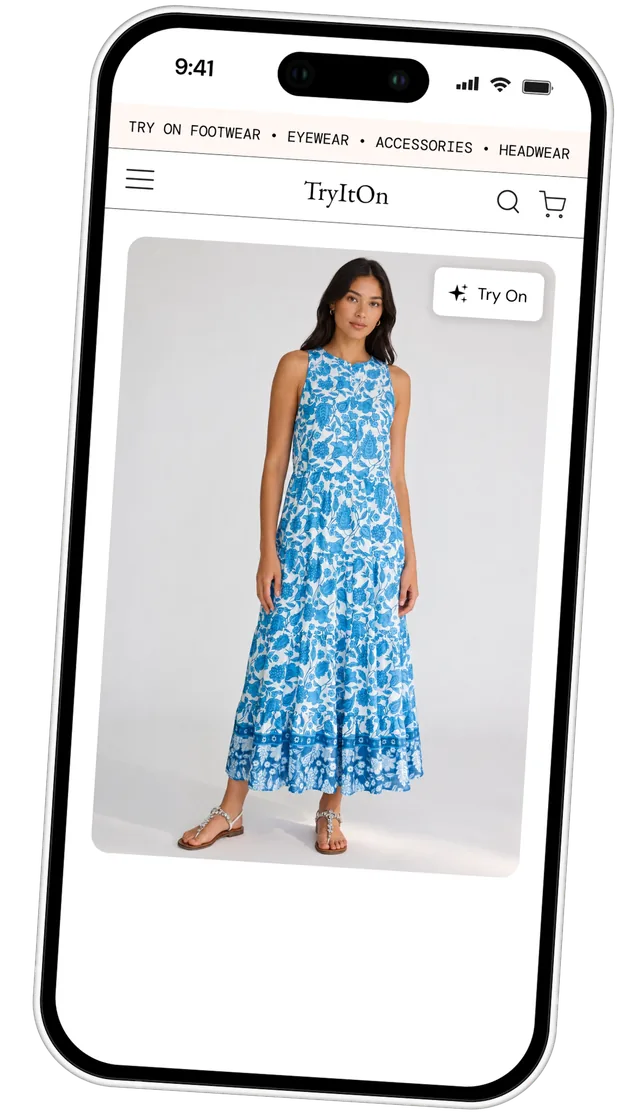

A Shopify product page with the TryItOn virtual try-on button on the product image

Trusted by shoppers at the world’s leading brands

Zalando
Amazon
Farfetch
Zara
Adidas
Nike
Zalando
Amazon
Farfetch
Zara
Adidas
Nike
Zalando
Amazon
Farfetch
Zara
Adidas
Nike
The same shopper wearing the product after the AI virtual try-onA shopper's own photo before the virtual try-onBeforeAfter
One photo, any product

Your product, on their body

Drag the handle. That's the whole promise of the app: a shopper's own photo goes in, your product comes back on them in seconds — close enough to real life that the fit question stops being a guess.

  • Works from the product images already in your catalog
  • No studio shoot, no 3D models, no per-product setup
  • Renders in seconds, on desktop and mobile storefronts

The virtual fitting room your Shopify store is missing

When shoppers can see it on themselves, they buy with confidence — and keep what they buy.

+27%lift in add-to-cart on try-on enabled products
−34%fewer size-and-fit returns
+19%higher average order value
2.4×longer time on product pages

Illustrative ranges based on virtual try-on benchmarks — your numbers depend on catalog and traffic.

How it works

How the Shopify virtual try-on app works

No migration, no rebuild, no developer time. Four steps between installing the app and your first converted try-on.

01

Install the app

One click from the Shopify App Store. TryItOn connects to your store and syncs your product catalog automatically.

02

Add the try-on block

Drop the TryItOn block into your product template in the theme editor and choose which products show the button.

03

Shoppers try it on

A customer uploads one photo and sees your product on themselves in seconds — without leaving the product page.

04

Watch it convert

Try-ons are attributed through to add-to-cart and purchase, so you can see what the fitting room is actually earning.

On the product page

From try-on to add to cart

The result opens right on the product page, with add-to-cart one tap away. Shoppers can share the look with a friend before they decide — which puts your product in a group chat, not just a wishlist.
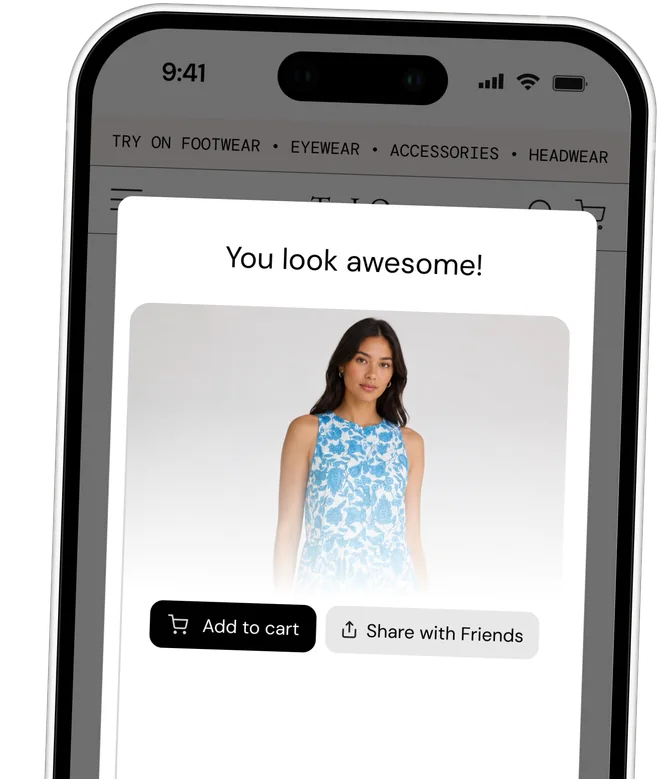
  • Result renders in seconds without leaving the product page
  • Add to cart directly from the try-on view
  • Share with friends turns a try-on into social proof
  • Every try-on is attributed to the cart and order that follow
The TryItOn widget showing a virtual try-on result with add to cart and share buttons on a Shopify store
Grow your list

Turn try-ons into subscribers

After a few try-ons, the widget can ask shoppers to join your newsletter to unlock more. It's the rare email capture that shoppers actually want to complete — they're mid-session and invested in the look.
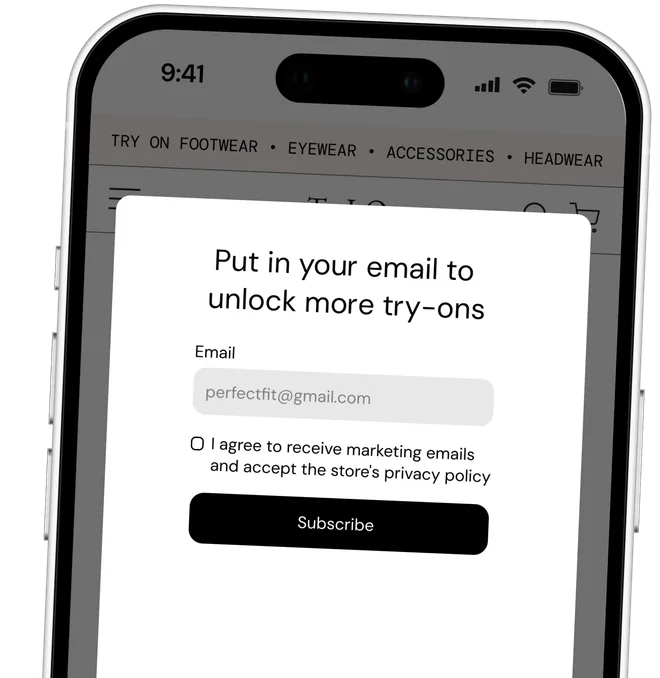
  • Ask after N try-ons — you choose when, and whether it's optional
  • Syncs to Mailchimp, Klaviyo, Omnisend, or your Shopify customers
  • Explicit marketing consent and your store's privacy policy, built in
  • Subscribers arrive tagged with the product they were trying on
MailchimpKlaviyoOmnisendShopify customers
The TryItOn newsletter capture step asking a Shopify shopper for their email to unlock more virtual try-ons
Multi-category

Virtual try-on for clothing, eyewear, jewelry & more

One app covers your whole catalog, so a store selling more than apparel doesn't need a separate try-on tool per category.

What you get

Built for merchants, not just for demos

Everything you need to run try-on as a real channel — placement, attribution, list growth, cost control, and your own branding.

Quick setup, any theme

A native theme app extension — not a pasted script. Installs on any Online Store 2.0 theme and leaves nothing behind if you remove it.

Real-time analytics

Try-on activity, add-to-cart, and conversion in one dashboard, with Web Pixel attribution tying try-ons to real orders.

Newsletter capture

Ask for an email after a few try-ons and sync it to Mailchimp, Klaviyo, Omnisend, or your Shopify customer list.

Custom branding

Set the button text, colors, and placement so the fitting room matches your storefront instead of fighting it.

Spend controls

A daily try-on limit plus a monthly overage cap, both visible up front. No surprise line on your Shopify invoice.

Photoreal results

The same AI engine behind our consumer apps, tuned for fit, drape, and proportion — not a sticker pasted over a photo.

Not on Shopify? The embed widget and REST API bring the same fitting room to any platform.

The difference

A product page that answers the fit question

Most apparel returns come down to fit and look — exactly what a static product photo can't communicate.

With TryItOn

  • Shoppers see your product on their own body
  • Fit questions answered on the product page, not in your inbox
  • Try-ons attributed to carts and orders
  • Emails captured while shoppers are still browsing

Without it

  • Shoppers guess their size from a model who isn't them
  • “Will it fit?” closes the tab
  • Order three sizes, keep one, eat the return
  • No signal on why a product page underperforms
Pricing

Shopify virtual try-on pricing

Every plan starts with a 7-day free trial and is billed through Shopify, on your regular invoice. Extra try-ons are charged at your plan’s rate, capped so the bill can’t run away.

Starter

For small stores getting started.

$16/ mo · billed annually

$199 billed yearly · 7-day free trial

Add to Shopify
  • 150 try-ons per month
  • $0.19 per extra try-on (capped at $50/mo)
  • Real-time analytics
  • Newsletter capture
Most popular

Growth

For growing stores that need volume.

$41/ mo · billed annually

$499 billed yearly · 7-day free trial

Add to Shopify
  • 500 try-ons per month
  • $0.16 per extra try-on (capped at $100/mo)
  • Real-time analytics
  • Priority support
Best value

Pro

For high-volume stores and brands.

$166/ mo · billed annually

$1,999 billed yearly · 7-day free trial

Add to Shopify
  • 2,500 try-ons per month
  • $0.14 per extra try-on (capped at $200/mo)
  • Remove TryItOn branding
  • Dedicated support

Higher volume, white-label, or a bespoke rollout? Talk to sales.

Adding virtual try-on to a Shopify store

Virtual try-on answers the one question a product photo can't: how will this look on me? On a Shopify storefront that question is the difference between an add-to-cart and a closed tab, and — after the order ships — between a keeper and a return. This page covers how the TryItOn Shopify app fits your store, where to place the try-on button, and how to read whether it's working.

How the Shopify virtual try-on app works

TryItOn installs from the Shopify App Store as a theme app extension. Your catalog syncs automatically, you choose which products are try-on enabled, and the button appears wherever you place the app block in your product template. Shoppers upload a single photo; the render comes back in seconds and lands on the same page they were already on.

  • No theme code: an app block in the theme editor, not a snippet pasted into Liquid — and a clean uninstall.
  • Per-product control: enable try-on for the collections where fit drives returns, and leave the rest of the catalog untouched.
  • Runs on our infrastructure: no GPUs to operate and nothing to maintain; try-ons queue as jobs so traffic spikes degrade gracefully.

Where to put the try-on button

A few high-intent placements outperform sprinkling try-on everywhere. Put it where the fit question actually surfaces.

  • Beside the gallery: the moment a shopper is studying the product image is the moment they wonder how it looks on them.
  • Above the fold on mobile: most Shopify apparel traffic is on a phone, so the button needs to be reachable without scrolling.
  • After add-to-cart: a confidence check before checkout heads off the size-and-fit hesitation that stalls orders.

One app, every product category

Clothing, eyewear, jewelry, footwear, and headwear all run through the same app, so a store selling more than apparel doesn't need a separate try-on tool per category. Fit-sensitive lines — dresses, denim, outerwear, occasion wear — move the most, while accessories benefit from richer, interactive product pages.

Turning try-ons into subscribers

A shopper who has just seen themselves in your product is unusually willing to hear from you. After a few try-ons the widget can ask for an email, with consent, and pass it straight to Mailchimp, Klaviyo, Omnisend, or your Shopify customer list — so the same feature that lifts conversion also grows the list you remarket to.

Proving the impact

Treat try-on like any other conversion experiment so the result is attributable rather than anecdotal. A Shopify Web Pixel ties each try-on to the cart and the order that followed.

  • A/B by cohort: expose try-on to a share of traffic and compare conversion, return rate, and AOV against a holdout.
  • Watch the right metrics: add-to-cart rate, size-related return rate, and revenue per visit on enabled products.
  • Segment by collection: read the lift per collection — fit-sensitive lines move far more than basics.

Costs and controls

Plans start at $19.99/month with a 7-day free trial and are billed through Shopify. Each plan includes a monthly try-on allowance; usage beyond it is charged per try-on up to a monthly cap. A daily try-on limit gives you a second ceiling, so a viral product page can't turn into an unexpected invoice.

Not on Shopify?

The same engine is available as an embeddable widget with a site key, or as a REST API for custom and headless storefronts — so a replatform or a second brand on a different stack doesn't mean losing the fitting room.

Frequently asked

  • A virtual try-on app adds a “try it on” button to your Shopify product pages. A shopper uploads one photo and AI renders your product on their own body, so they can judge fit and look before they add to cart. TryItOn installs as a theme app extension, which means no theme code and nothing left behind if you uninstall.

  • Minutes. Install the app, pick the products you want try-on enabled for, then add the TryItOn block to your product template in the theme editor. It works on any Online Store 2.0 theme and no developer is needed.

  • Clothing, eyewear, jewelry, footwear, and headwear — from one app. You choose per product which ones show the try-on button, so you can start with the fit-sensitive lines that drive the most returns.

  • No. TryItOn ships as a theme app extension, so the try-on button is an app block you drag into your product template. Uninstalling removes it cleanly — no leftover snippets in your theme.

  • Plans start at $19.99/month with a 7-day free trial, and yearly billing saves about 17%. Each plan includes a monthly try-on allowance; anything beyond it is charged per try-on up to a monthly cap you can see before you approve the charge.

  • Through Shopify's own billing, on your regular Shopify invoice — no separate card or contract. Usage above your plan's allowance appears as a capped usage charge.

  • Yes. Set a daily try-on limit in Settings and the widget stops generating once your store hits it that day. Combined with the monthly overage cap, that gives you a hard ceiling on spend.

  • Yes. The widget is responsive and built thumb-first, which matters because most Shopify apparel traffic is on a phone. It looks and behaves the same on desktop storefronts.

  • Yes. Button text, colors, and placement are yours to set, and on the top plan the “Powered by TryItOn” line is removed so the fitting room reads as a native part of your store.

  • Yes. You can ask shoppers to join your newsletter after a few try-ons and sync those signups straight to Mailchimp, Klaviyo, Omnisend, or your Shopify customer list — turning a browsing session into a subscriber.

  • Real-time try-on activity, add-to-cart, and conversion. A Shopify Web Pixel ties each try-on through to the cart and the order that followed, so you can read lift as revenue rather than as a try-on count.

  • Photos are processed to generate the try-on and are never used for ad targeting or model training. We support Shopify's mandatory data-request, customer-redact, and shop-redact webhooks, and our DPA covers the storefront flow.

Your photos
are yours

Body images are sensitive. We treat them that way — encrypted, never sold, and gone the second you say so.

  • Built to GDPR standards

    Your data rights — access, correction, portability, and deletion — are honored on every plan, no matter where you live.

  • Never used to train AI

    Your selfies aren't sold, shared with brands, or fed into model training pipelines. They stay yours.

  • Encrypted end-to-end

    Photos are encrypted in transit and at rest. Only you can see what's in your wardrobe.

  • Delete anything, anytime

    One tap clears a try-on. Two clears your whole wardrobe and account. We don't keep shadow copies.

For Shopify merchants

Turn “will it fit me?” into add to cart

Add an AI fitting room to your Shopify product pages and let customers shop with confidence.

7-day free trial. No theme code. Cancel anytime.